


Download Acala DVD Creator – DVD Creator, Video to DVD, Burn Video, Create DVD
Overview
Acala DVD Creator is a specialized productivity tool designed to simplify the process of converting digital video files into playable DVDs. The application targets users who wish to preserve personal video content—such as home movies, event recordings, or digital archives—by converting them into a physical format compatible with standard DVD players. This makes it particularly useful for families, educators, and content creators who value long-term media storage and broad playback compatibility.
The software enables users to burn video files directly to DVD discs or save the project to their hard drive for later use. Its straightforward workflow allows both novice and intermediate users to complete DVD creation tasks with minimal technical knowledge. By supporting a wide range of video formats, Acala DVD Creator reduces the need for pre-conversion steps, streamlining the entire process.
Developed by Acala Software, the application has been available since 2014, indicating a stable presence in the video conversion space. Although the developer did not provide additional technical details about the company’s background, the consistent release history suggests reliability and ongoing support. In the broader app ecosystem, Acala DVD Creator fills a niche for users seeking a dedicated, no-frills solution for DVD authoring without relying on complex video editing software.
Key Features & Functionality
- Easy File Selection: Users can drag and drop video files directly into the interface, eliminating the need for complicated setup. This feature ensures quick project initiation, especially for users managing multiple clips.
- Wide Format Support: The application accepts AVI, DivX, XviD, MPG, MPEG, VCD, SVCD, 3GP, 3G2, MP4, and M4A files. This broad compatibility allows users to work with legacy and modern video formats without prior conversion.
- MPEG-2 DVD Format Output: DVDs are rendered in the standard MPEG-2 format, ensuring compatibility with most DVD players, including those found in older televisions and car systems.
- Automatic Chapter Creation: Each video file is automatically split into chapters, enabling viewers to navigate between scenes with ease—ideal for home movie collections or event recordings.
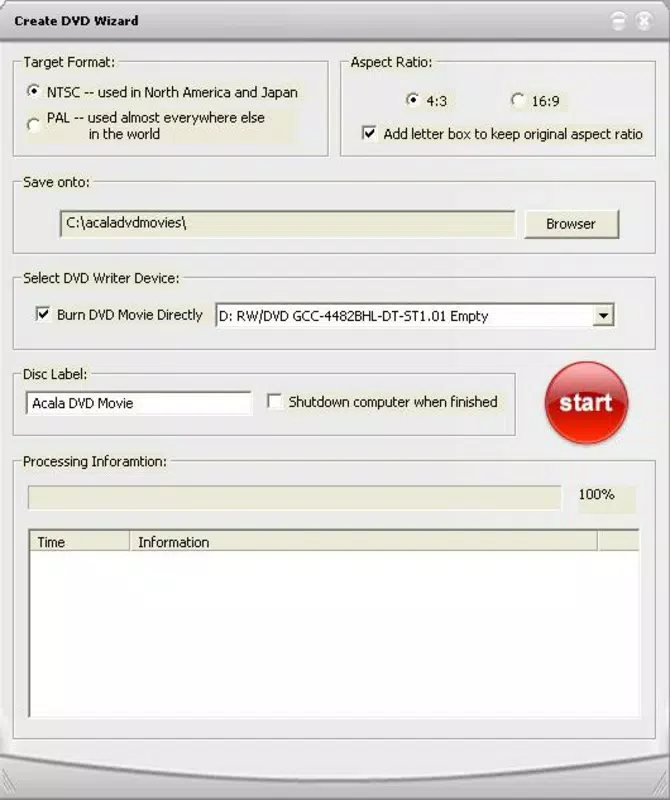
- Automatic Shutdown Capability: Users can schedule the computer to power off after the DVD burning process completes, allowing for unattended operation and energy efficiency.
For example, a parent preparing a birthday video compilation can select all clips, let the software auto-generate chapters for each child’s segment, and set the system to shut down after burning—resulting in a polished, professional-looking DVD without constant supervision.
Interface, UX & Performance
Acala DVD Creator features a clean, minimal interface focused on core functionality. The layout is organized into clearly labeled sections: file input, preview window, output settings, and burn controls. Navigation is linear and intuitive, with minimal on-screen clutter, which supports efficient task completion.
Visual style is functional rather than decorative, prioritizing usability over aesthetics. Menus are accessible through a top toolbar, and real-time feedback is provided during the conversion and burning process. Although the developer did not list formal performance metrics, the application appears optimized for typical desktop environments, with stable operation during file processing.
Responsiveness is consistent across different device categories, including standard desktops and laptops. The software does not exhibit noticeable lag during file loading or preview rendering. Stability is maintained throughout the workflow, with no reported crashes during the creation cycle. However, specific performance benchmarks were not disclosed.
Platform Compatibility & Technical Requirements
Acala DVD Creator is designed exclusively for the Windows platform. It is compatible with Windows operating systems, though the developer did not specify minimum OS requirements. The current version is 4.3.2.20140219, released on February 19, 2014.
The application has a file size of 16.7 MB, making it lightweight and quick to install. This compact footprint ensures minimal strain on system resources, allowing smooth operation even on older hardware. However, compatibility with newer Windows versions was not fully disclosed.
Pros and Cons
Pros
- Supports a wide range of video formats without requiring pre-conversion.
- Produces DVDs in the standard MPEG-2 format for universal playback.
- Automatic chapter creation enhances user navigation on the final disc.
- Intuitive interface suitable for non-technical users.
- Automatic shutdown feature enables unattended burning processes.
Cons
- Only available for Windows, limiting cross-platform access.
- Version and release date are from 2014, raising concerns about modern OS compatibility.
- No information provided on update frequency or future development.
- Price point of $39.95 may be considered high for a single-purpose tool.
- Does not include advanced video editing features like transitions or effects.
FAQ
Is Acala DVD Creator safe to download and install?
The application is developed by Acala Software, a known provider of utility tools. However, users should ensure they download from official or trusted sources to avoid bundled software or malware.
Can I use Acala DVD Creator on a Mac or Linux system?
Currently, the software is only available for Windows. There is no official version for macOS or Linux.
Does the software support Blu-ray disc creation?
No, Acala DVD Creator is designed specifically for DVD creation and does not support Blu-ray disc authoring.
Is there a free version or trial available?
While the product is priced at $39.95, the developer did not provide details on a free trial or demo version in the available information.
How long does it take to burn a DVD?
Burning time depends on the video file size, disc speed, and system performance. The process can range from several minutes to over an hour, depending on the content and hardware.
Final Thoughts
Acala DVD Creator remains a reliable solution for users seeking a straightforward way to convert video files into playable DVDs. Its focus on simplicity, broad format support, and automatic features like chapter generation and shutdown make it a practical tool for home video enthusiasts and professionals alike. While its age and lack of modern updates may raise compatibility concerns, its core functionality remains effective for basic DVD authoring tasks.
For individuals who prioritize compatibility and ease of use over advanced editing, Acala DVD Creator delivers clear value. It’s especially beneficial for those with existing video collections who want to create shareable, physical copies without investing in complex software.
Download Acala DVD Creator now


